
Last updated on
Oct 31, 2026

Get the free California CalFresh Notice of Change
We are not affiliated with any brand or entity on this form

Fill out
Complete the form online in a simple drag-and-drop editor.

eSign
Add your legally binding signature or send the form for signing.

Share
Share the form via a link, letting anyone fill it out from any device.

Export
Download, print, email, or move the form to your cloud storage.
Why pdfFiller is the best tool for your documents and forms


End-to-end document management
From editing and signing to collaboration and tracking, pdfFiller has everything you need to get your documents done quickly and efficiently.
Accessible from anywhere
pdfFiller is fully cloud-based. This means you can edit, sign, and share documents from anywhere using your computer, smartphone, or tablet.
Secure and compliant
pdfFiller lets you securely manage documents following global laws like ESIGN, CCPA, and GDPR. It's also HIPAA and SOC 2 compliant.
What is CalFresh Change Notice
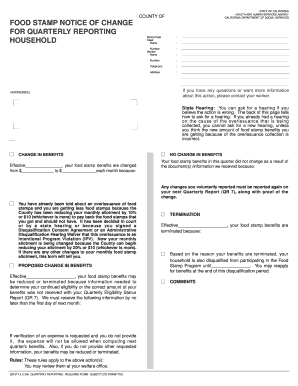
The California CalFresh Notice of Change is a government form used by California residents to notify changes in their CalFresh benefits.
pdfFiller scores top ratings on review platforms




Who needs CalFresh Change Notice?
Explore how professionals across industries use pdfFiller.

CalFresh Change Notice is needed by:
-
California households receiving CalFresh benefits
-
CalFresh program workers and representatives
-
Individuals requiring assistance with benefit changes
-
Residents preparing for a CalFresh hearing
-
California Department of Social Services staff
Comprehensive Guide to CalFresh Change Notice
What is the California CalFresh Notice of Change?
The California CalFresh Notice of Change is a form used to notify the California Department of Social Services about changes affecting CalFresh benefits. This document is crucial for recipients who experience any modifications in their circumstances that may impact their benefits. Issued by the County Social Services agencies, this form helps ensure that beneficiaries receive the appropriate level of support based on their current situation.
Purpose and Importance of the California CalFresh Notice of Change
The primary purpose of the California CalFresh Notice of Change is to facilitate accurate adjustment of benefits for recipients. Reporting changes promptly can prevent overpayment or underpayment of benefits, ensuring that recipients are only receiving the amount they are entitled to. By reporting changes accurately, recipients can maintain their eligibility and avoid potential disruptions in their assistance.
Who Needs the California CalFresh Notice of Change?
The California CalFresh Notice of Change is specifically intended for individuals receiving CalFresh benefits. Certain scenarios necessitate the completion of this form, such as changes in household income, family size, or residency status. These modifications typically require recipients to file this form to update their case with the California Department of Social Services.
How to Fill Out the California CalFresh Notice of Change Online (Step-by-Step)
Filling out the California CalFresh Notice of Change online can be straightforward if you follow these steps:
-
Access the form on a secure platform like pdfFiller.
-
Enter your personal information, including your Name, Number, and Worker Name.
-
Fill out the specific details regarding the change in your situation.
-
Ensure all required fields are completed accurately.
-
Review the information before submitting the form electronically.
Key Features of the California CalFresh Notice of Change
The California CalFresh Notice of Change includes several key components that facilitate its purpose:
-
Fillable fields prompting for essential personal information.
-
Checklists and instructions for clarifying the reasons for the changes.
-
Sections guiding recipients on how to request a hearing if needed.
-
Clear instructions for filling out each part of the form for accuracy.
Submission Methods for the California CalFresh Notice of Change
Users have several options for submitting the completed California CalFresh Notice of Change:
-
Submitting the form online through approved platforms.
-
Mailing the form to the appropriate county office.
-
Hand-delivering the form to a local Department of Social Services office.
It’s vital to be aware of submission deadlines and anticipated processing times, as delays could impact your benefits.
Consequences of Not Filing or Late Filing
Failure to file the California CalFresh Notice of Change on time can lead to serious consequences:
-
Termination of CalFresh benefits, resulting in loss of food assistance.
-
Potential reduction in monthly benefit amounts due to reporting errors.
-
Increased likelihood of rejection for future benefits or applications.
How to Review and Validate Your California CalFresh Notice of Change
Before submitting your form, it’s essential to review it thoroughly to avoid common errors. Here’s a checklist to help you validate your form:
-
Check all personal information for accuracy.
-
Ensure all required fields are completed.
-
Review the change details to confirm they accurately reflect your situation.
-
Look for any inconsistent or missing information that might delay processing.
Security and Compliance Related to the California CalFresh Notice of Change
When handling the California CalFresh Notice of Change, data protection is a top priority. Users should be aware of the security measures in place on platforms like pdfFiller, which employs 256-bit encryption and meets SOC 2 Type II and HIPAA compliance standards. It’s crucial to safeguard your personal information and ensure compliance with privacy regulations while submitting sensitive documents.
Effortlessly Fill Out and Submit Your California CalFresh Notice of Change with pdfFiller
Utilizing pdfFiller to fill out and manage your California CalFresh Notice of Change can enhance your experience. The platform provides features for seamless editing, eSigning, and secure submission, making the process straightforward and efficient. By leveraging these capabilities, users can ensure their forms are accurate and submitted securely.
How to fill out the CalFresh Change Notice
-
1.Start by accessing pdfFiller and searching for 'California CalFresh Notice of Change' to open the form.
-
2.Once the form is loaded, familiarize yourself with the layout, which includes multiple fillable fields.
-
3.Gather all necessary information, including your name, number, worker name, telephone, and address before you begin filling out the form.
-
4.Click on each field to enter your personal information accurately. Ensure you double-check for typos or missing information.
-
5.Follow the instructions provided in the form to detail the changes in your benefits, completing all necessary sections thoroughly.
-
6.Stay organized as you fill out the form, using pdfFiller's tools to add any additional comments or notes if required.
-
7.After completing the form, review all entries to confirm that the information is correct and complete, checking each field consistently.
-
8.Once you are satisfied with your form, you can save your work, download a copy, or submit it directly through pdfFiller’s submission options.

Who is eligible to use the California CalFresh Notice of Change?
Any California resident currently receiving CalFresh benefits who needs to report a change in their circumstances is eligible to use this form.
What should I include in the notice of change?
You should include any specific details regarding the change in your benefits, such as changes in income, household size, or any other factor affecting your eligibility.
How do I submit the completed form?
You can submit the completed California CalFresh Notice of Change form electronically via pdfFiller or print it out and deliver it to your local County Department of Social Services office.
Is there a deadline for submitting this form?
Yes, it’s important to submit changes as soon as they occur to avoid any disruptions in your CalFresh benefits. Check with your local office for specific deadlines.
What documents do I need to attach with the form?
While it typically requires only the notice of change, additional supporting documents may be needed depending on the nature of the changes reported. Check the instructions for any specifics.
How long does it take to process the California CalFresh Notice of Change?
Processing times can vary, but it usually takes a few weeks. It’s advisable to follow up with your local office if you haven't received confirmation of your changes.
What are common mistakes to avoid when filling out the form?
Common mistakes include omitting important details, providing incorrect information, and failing to sign or date the form. Ensure all fields are completed accurately.
Related Content
Related Forms




Get the latest insights from our blog


If you believe that this page should be taken down, please follow our DMCA take down process
here
.
This form may include fields for payment information. Data entered in these fields is not covered by PCI DSS compliance.